以Fresco图片做transitionName跳转新页面出现白/黑屏问题
最近接了一个需求,需要以图片为共享元素,给两个页面加上过渡动画,因为这两个页面都是Activity,所以,很快啊,技术方案就想出来了:将两个页面的图片作为共享元素,以同一个fileId为transitionName执行动画跳转。
背景
FrescoTransitionApp.kt
因为图片是从网络上下载下来,且为了提高展示速度,所以使用了Fresco框架(有三级缓存机制)
1
2
3
4
5
6
7
8
9
10
11
| package com.phc.demo.fresco.transition
import android.app.Application
import com.facebook.drawee.backends.pipeline.Fresco
class FrescoTransitionApp : Application() {
override fun onCreate() {
super.onCreate()
Fresco.initialize(this)
}
}
|
ActivityA.kt
1
2
3
4
5
6
7
8
9
10
11
12
13
14
15
16
17
18
19
20
21
22
23
24
25
26
27
28
29
30
31
32
33
34
35
36
37
38
39
40
41
42
43
44
45
46
47
48
49
50
51
52
53
54
55
56
57
58
59
60
61
62
63
64
65
66
67
68
69
70
71
72
73
74
75
76
77
78
79
80
81
82
83
84
85
86
| package com.phc.demo.fresco.transition
import android.content.Intent
import android.graphics.drawable.Animatable
import android.os.Bundle
import androidx.appcompat.app.AppCompatActivity
import androidx.core.app.ActivityOptionsCompat
import com.demo.phc.databinding.ActivityAFrescoTransitionBinding
import com.facebook.drawee.backends.pipeline.Fresco
import com.facebook.drawee.controller.BaseControllerListener
import com.facebook.drawee.generic.GenericDraweeHierarchyBuilder
import com.facebook.imagepipeline.image.ImageInfo
import com.phc.log.PHCLog
class ActivityA : AppCompatActivity() {
private lateinit var binding: ActivityAFrescoTransitionBinding
companion object {
private const val IAMGE_URL =
"https://sns-na-i2.xhscdn.com/notes_pre_post/1040g3k031to4malimu0g5n2jtgf47g1bhbrofsg?imageView2/2/w/1440/format/heif/q/45&redImage/frame/0&ap=1&sc=DETAIL&sign=e1e6ab635bbbf58872eaeeb1bf522461&t=69bd2e52&origin=0"
}
override fun onCreate(savedInstanceState: Bundle?) {
super.onCreate(savedInstanceState)
binding = ActivityAFrescoTransitionBinding.inflate(layoutInflater)
setContentView(binding.root)
initView()
}
private fun initView() {
val listener = object : BaseControllerListener<ImageInfo>() {
override fun onFinalImageSet(
id: String?,
imageInfo: ImageInfo?,
animatable: Animatable?
) {
imageInfo?.let { info ->
val width = info.width
val height = info.height
val pixelBytes = 4
val bitmapSize = width * height * pixelBytes
PHCLog.d(
"ActivityA",
"Image load finished, bitmap size is ${
String.format(
"%.2f",
bitmapSize / 1024f / 1024f
)
}MB"
)
}
}
}
binding.draweeViewA.apply {
post {
PHCLog.d(
"ActivityA",
"Image loaded, image view size is ${this.width}x${this.height}"
)
}
setOnClickListener {
val options = ActivityOptionsCompat.makeSceneTransitionAnimation(
this@ActivityA,
this,
"shared_image_transition"
)
val intent = Intent(this@ActivityA, ActivityB::class.java)
startActivity(intent, options.toBundle())
}
val controller = Fresco.newDraweeControllerBuilder()
.setUri(IAMGE_URL)
.setControllerListener(listener)
.build()
val hierarchy = GenericDraweeHierarchyBuilder(resources)
.build()
this.controller = controller
this.hierarchy = hierarchy
}
}
}
|
activity_a_fresco_transition.xml
1
2
3
4
5
6
7
8
9
10
11
12
13
14
| <?xml version="1.0" encoding="utf-8"?>
<androidx.constraintlayout.widget.ConstraintLayout xmlns:android="http://schemas.android.com/apk/res/android"
xmlns:app="http://schemas.android.com/apk/res-auto"
android:layout_width="match_parent"
android:layout_height="match_parent">
<com.facebook.drawee.view.SimpleDraweeView
android:id="@+id/draweeViewA"
android:layout_width="match_parent"
android:layout_height="300dp"
android:transitionName="shared_image_transition"
app:layout_constraintTop_toTopOf="parent" />
</androidx.constraintlayout.widget.ConstraintLayout>
|
ActivityB.kt
1
2
3
4
5
6
7
8
9
10
11
12
13
14
15
16
17
18
19
20
21
22
23
24
25
26
27
28
29
30
| package com.phc.demo.fresco.transition
import android.os.Bundle
import androidx.appcompat.app.AppCompatActivity
import com.demo.phc.databinding.ActivityBFrescoTransitionBinding
class ActivityB : AppCompatActivity() {
private lateinit var binding: ActivityBFrescoTransitionBinding
companion object {
private const val IAMGE_URL = "https://sns-na-i2.xhscdn.com/notes_pre_post/1040g3k031to4malimu0g5n2jtgf47g1bhbrofsg?imageView2/2/w/1440/format/heif/q/45&redImage/frame/0&ap=1&sc=DETAIL&sign=e1e6ab635bbbf58872eaeeb1bf522461&t=69bd2e52&origin=0"
}
override fun onCreate(savedInstanceState: Bundle?) {
super.onCreate(savedInstanceState)
binding = ActivityBFrescoTransitionBinding.inflate(layoutInflater)
setContentView(binding.root)
initView()
}
private fun initView() {
binding.draweeViewB.apply {
setImageURI(IAMGE_URL)
transitionName = "shared_image_transition"
setOnClickListener {
finishAfterTransition()
}
}
}
}
|
activity_b_fresco_transition.xml
1
2
3
4
5
6
7
8
9
10
11
12
13
14
| <?xml version="1.0" encoding="utf-8"?>
<androidx.constraintlayout.widget.ConstraintLayout xmlns:android="http://schemas.android.com/apk/res/android"
xmlns:app="http://schemas.android.com/apk/res-auto"
android:layout_width="match_parent"
android:layout_height="match_parent">
<com.facebook.drawee.view.SimpleDraweeView
android:id="@+id/draweeViewB"
android:layout_width="match_parent"
android:layout_height="300dp"
app:layout_constraintBottom_toBottomOf="parent"
app:layout_constraintTop_toTopOf="parent" />
</androidx.constraintlayout.widget.ConstraintLayout>
|
展示效果
可以看到,每次动效结束之后,都会变成白屏。这也是本次需求遇到的最大的障碍
原因
出现这个问题的表面原因其实很好“猜测”,肯定是因为这张图片太大了,导致ActivityA跳转到ActivityB的时候,**bitmap被回收掉了,所以导致做退场动画(ActivityB->ActivityA)的时候,Fresco框架根据url在缓存中找不到这个bitmap了。**我们可以打印下日志看看:

可以看到这张图还是蛮大的(>10MB),所以具体原因是:
Activity A 进入后台(被 B 覆盖)时会 onStop,Fresco 默认会在视图从窗口分离时释放已解码的位图以省内存;返回时共享元素过渡先显示视图,但图片需从缓存/网络重新加载,期间会显示占位(常为白色)。
A 被盖住后会 onStop,此时 SimpleDraweeView 会从窗口上 detach。Fresco 默认会在 detach 时 释放已解码的位图(省内存),所以内存里的那一帧图可能没了。
finishAfterTransition() 做的是「反向共享元素」过渡一开始就要在 A 上画出共享的那块区域;但这时 图往往还没重新 decode 完(即使磁盘缓存很快,也有一段空窗)。空窗期 Drawee 会画 占位/背景,很多主题下就是 白底,你就看到「闪白」。
为什么去 B 不明显?前进时 B 上的图正在 setImageURI 加载,过渡和加载节奏容易「对齐」;而回 A 时,问题出在 A 在后台被 Fresco 清过图,和「过渡要立即有画面」冲突更大。
解决方案
1. 页面不可见时不清除Bitmap
这个方式很简单,就是对Activity的SimpleDraweeView设置setLegacyVisibilityHandlingEnabled(true),即
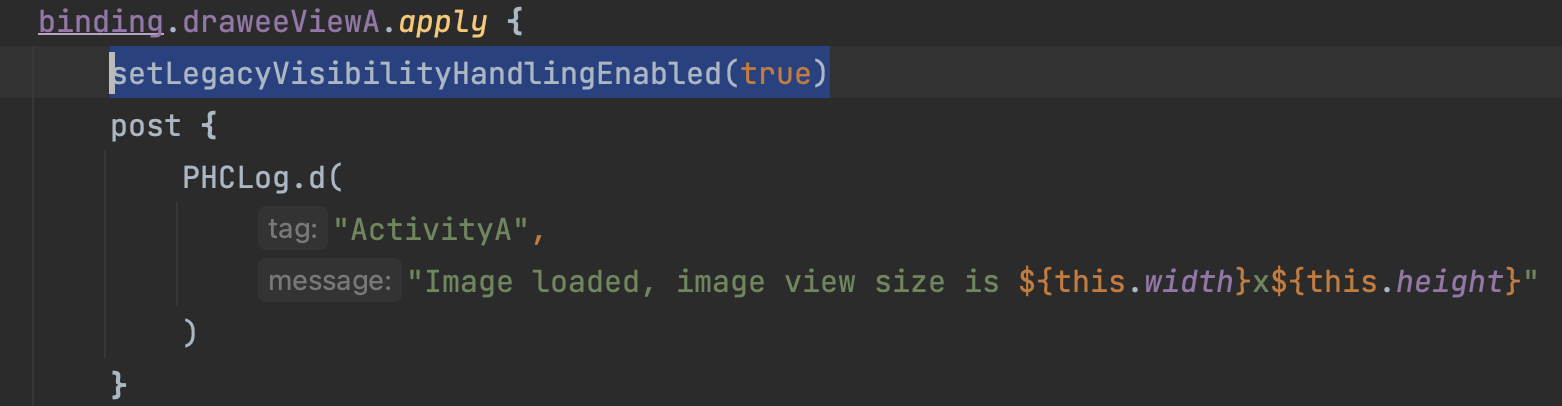
我们可以看一下AI对setLegacyVisibilityHandlingEnabled方法的解释
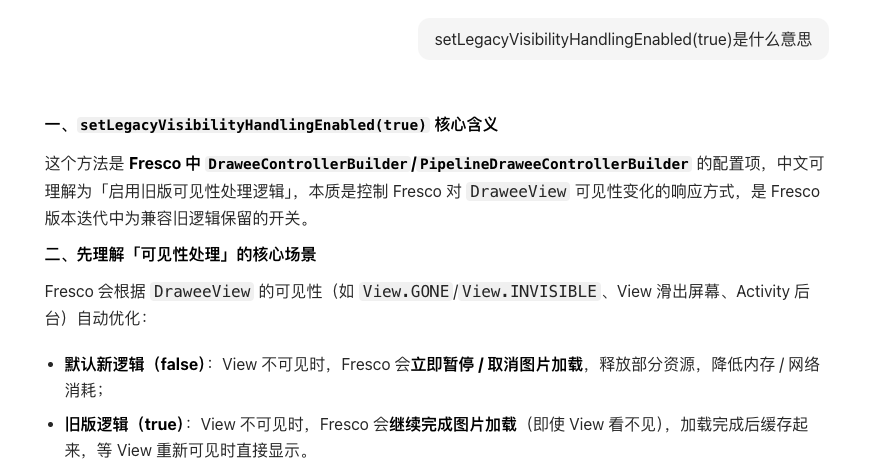
| 配置值 |
核心行为 |
适用场景 |
优缺点 |
| true(启用旧版) |
View 不可见时,图片加载不中断,加载完成后缓存 |
1. 需要「预加载」图片(比如 View 先 GONE 后快速显示);2. 兼容 Fresco 1.x 及更早版本的旧逻辑;3. 避免「View 刚显示就重新加载」导致的闪屏 |
✅ 预加载提升体验;✅ 兼容旧代码❌ 浪费网络 / 内存(加载看不见的图片) |
| false(默认新版) |
View 不可见时,立即暂停 / 取消加载,重新可见时恢复加载 |
1. 列表 / 长页面(大量 View 滑出屏幕);2. 对内存 / 流量敏感的场景(如低配置设备、移动网络) |
✅ 节省资源;✅ 避免无用加载❌ 重新显示 View 时可能需要重新加载,有短暂空白 |
2. 对ActivityA的bitmap进行压缩,减小内存,使其不容易被回收
还有一种方式能够不加剧内存压力的方式,那就是对在做转场动画的“快照”时,对其进行压缩处理,降低内存,减小被回收的概率,具体方式如下:
1
2
3
4
5
6
7
8
9
10
11
12
13
14
15
16
17
18
19
20
21
22
23
24
25
26
27
28
29
30
31
32
33
34
35
36
37
38
39
40
41
42
43
44
45
46
47
48
49
50
51
52
53
54
55
56
57
58
59
60
61
62
63
64
65
66
67
68
69
70
71
72
73
74
75
76
77
78
79
| FUNCTION makeSceneTransitionOptionsWithCompressedBitmap(imageBean: ImageBean) -> ActivityOptionsCompat OR NULL:
// 前置检查:获取上下文和目标View,校验有效性
activity = 从context获取当前Activity
IF activity IS NULL: RETURN NULL
photoView = 获取当前位置的大图展示View(PhotoView)
IF photoView IS NULL OR photoView宽度/高度 ≤ 0: RETURN NULL
pos = 获取当前图片位置
srcBitmap = NULL // 原始Bitmap
isOwnedBitmap = FALSE // 标记是否需要手动回收原始Bitmap
TRY:
// 步骤1:获取原始Bitmap(区分直播照片/普通照片)
IF 当前位置是直播照片:
liveFrameBitmap = 获取直播照片当前帧的Bitmap
IF liveFrameBitmap IS NOT NULL:
srcBitmap = liveFrameBitmap
isOwnedBitmap = TRUE // 直播帧Bitmap需手动回收
ELSE:
(srcBitmap, isOwnedBitmap) = 从photoView提取原始Bitmap
ELSE:
(srcBitmap, isOwnedBitmap) = 从photoView提取原始Bitmap
IF srcBitmap IS NULL: RETURN NULL
CATCH 内存溢出异常:
打印日志「获取共享元素Bitmap失败(OOM)」
RETURN NULL
CATCH 通用异常:
打印日志「获取共享元素Bitmap失败」
RETURN NULL
// 打印压缩前Bitmap信息(宽/高/内存大小)
打印日志「压缩前:宽=${srcBitmap.width} 高=${srcBitmap.height} 大小=${srcBitmap.byteCount}KB」
// 步骤2:等比例压缩Bitmap(不超过最大尺寸,不放大)
maxSize = 共享元素Bitmap最大限制尺寸
// 计算等比例缩放系数(取宽/高缩放比的较小值,且不超过1倍)
scale = MIN(maxSize/srcBitmap.width, maxSize/srcBitmap.height)
scale = MIN(scale, 1.0)
targetWidth = 取整(srcBitmap.width * scale),最小为1
targetHeight = 取整(srcBitmap.height * scale),最小为1
compressedBitmap = NULL
TRY:
// 创建缩放后的Bitmap
scaledBitmap = 创建缩放后的Bitmap(srcBitmap, targetWidth, targetHeight, 开启抗锯齿)
IF scaledBitmap 与 srcBitmap是同一对象:
// 尺寸未变,创建独立副本避免引用冲突
compressedBitmap = 创建Bitmap副本(srcBitmap)
IF isOwnedBitmap: 回收srcBitmap
ELSE:
compressedBitmap = scaledBitmap
IF isOwnedBitmap: 回收srcBitmap
CATCH 通用异常:
打印日志「Bitmap压缩失败」
// 异常时回收原始Bitmap(若需手动回收)
IF isOwnedBitmap:
TRY: 回收srcBitmap
CATCH: 打印日志「回收原始Bitmap失败」
RETURN NULL
// 打印压缩后Bitmap信息
打印日志「压缩后:宽=${compressedBitmap.width} 高=${compressedBitmap.height} 大小=${compressedBitmap.byteCount}KB」
// 步骤3:将压缩后的Bitmap设回View,配置共享元素
IF photoView是ImageView类型:
将compressedBitmap封装为BitmapDrawable,设置给photoView
为photoView设置transitionName = imageBean.fileid
// 创建并返回共享元素转场动画选项
RETURN 创建转场动画选项(activity, photoView, imageBean.fileid)
ELSE:
// View类型不匹配,回收压缩后的Bitmap
回收compressedBitmap
RETURN NULL
|